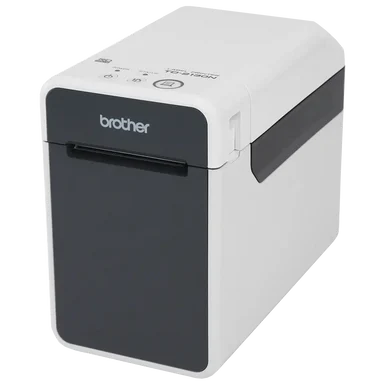
Store staff2-inch desktop, older models

Brother TD-2 series

Our earlier 2-inch printer. Every model works over a network cable. The NWB models can also use Bluetooth.

Brother TD-2 series
Models
TD-2125NNetwork cable only.
TD-2135NNetwork cable only.
TD-2125NWBNetwork cable or Bluetooth.
TD-2135NWBNetwork cable or Bluetooth.
Network cableBluetooth (NWB only)App: iOS and Android
1

Connect with a network cable

Works on every TD-2 model.

  1. Plug in the power and switch on

    Plug the printer into a socket and turn it on.

  2. Plug in the network cable

    Plug one end into the printer and the other into a free network (Ethernet) port on your router.

  3. Put your tablet on the same network

    Your phone or tablet can be on Wi-Fi, as long as it's on the same router the printer is cabled to.

    Same routerIf your tablet is on a different network, the app can't see the printer.
  4. Connect in the Dill app

    Log in, tap the printer button at the top of Home, pick Network and tap Connect. The square turns green.

2

Connect with Bluetooth (NWB models)

Only TD-2125NWB and TD-2135NWB have Bluetooth.

  1. Plug in and switch on

    Plug the printer into a socket and turn it on.

  2. Check the blue light on the back

    The Bluetooth light on the back should flash blue. If it doesn't, press and hold the Feed button for 5 seconds to turn Bluetooth on.

  3. Pair it with your phone or tablet

    In your Bluetooth settings, tap the printer with the printer icon next to it. Its name starts with the model, like TD-2125NWB_8021.

  4. Connect in the Dill app

    Log in, tap the printer button at the top of Home, pick Bluetooth and tap Connect. The square turns green.

3

Load a label roll

  1. Open the cover

    Press the cover release and lift the cover.

  2. Open the guides and drop the roll in

    Slide the roll guides apart, put the roll in, then slide the guides in so they hold it.

  3. Feed the labels and close

    Pull the end of the labels out under the guides past the front, then close the cover until it clicks.

4

Keep it clean

Dirt causes white streaks on labels or jams.

  1. Clean the print head

    Wipe it with a cotton swab dipped in isopropyl alcohol. Do it once a day or every roll change, whichever comes first.

  2. Clean the roller

    Dab it with a piece of sticky tape to lift off dirt.

  3. Clean the label exit if labels jam

    Unplug the printer, then wipe the exit slot with a cloth slightly dampened with isopropyl alcohol.