🚀 Meet Dill at Restaurant & Takeaway Innovation Expo in London at the ExCel • Sept 29-30

PPDS & Natasha’s Law
Ensure compliance with Natasha’s Law, Effortlessly!


Product Title
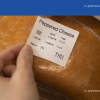
Customisable product titles with automatic scaling to fit perfectly, ensuring legibility and compliance with Natasha’s Law. Stay on-brand with personalised fonts and styles.
Ingredients & Allergens
Automatic allergen detection with bold highlighting of the 14 major allergens. Ensure compliance with Natasha’s Law, using pre-built templates that flag allergens for consumer safety.
Company Logo
Enhance your branding by adding your logo to every label. Customisable size and placement options ensure your brand stays front and center, strengthening your business identity.
Barcode
Automatically generate custom or pre-defined barcodes based on product codes and prices. Manage inventory seamlessly with Dill’s easy-to-integrate barcode solutions.
Expiry Date (Use-By/Best Before)
Automated expiry date calculations based on product shelf life. Never miss a due date with Dill’s built-in date management feature, which helps you stay compliant and reduce waste.
Custom text
A personalized description of the product, including storage instructions, cooking recommendations, or other relevant information to enhance consumer understanding and usage.
Pricing Management
Effortlessly manage pricing with real-time updates. Link your products with dynamic pricing, ensuring accurate and consistent labeling across all products.
What is Natasha’s Law?
Natasha’s Law, implemented in the UK, mandates that all Pre-Packed for Direct Sale (PPDS) foods, including items like sandwiches, salads, and pastries, must have a full list of ingredients with allergens clearly highlighted. The law focuses on consumer safety, ensuring that individuals with food allergies can make informed choices about the food they purchase. The law specifically highlights 14 major allergens that must be clearly labelled to protect sensitive consumers.
Implications and Problems
The introduction of Natasha’s Law presents several challenges for businesses in the hospitality sector, particularly those offering Grab-and-Go options, such as forecourt operations, bakeries, restaurants, and cafés. Key issues include:
- Compliance Challenges: Businesses must ensure that all PPDS items are accurately labelled to meet legal requirements. Failure to comply can lead to significant penalties and harm to consumer trust.
- Labelling Complexity: Manually tracking ingredients, allergens, and expiry dates is labor-intensive and prone to human error. Inaccurate labelling can result in serious health risks for customers with allergies.
- Operational Strain: Fast-paced environments demand quick and efficient labelling solutions. Inadequate labelling systems can disrupt operations and slow down service, impacting customer satisfaction.
How Dill Solves These Issues
Dill offers a comprehensive solution to simplify and streamline the labelling process for businesses:
- Automated Allergen Flagging: Dill automatically scans ingredients to detect and flag any of the 14 major allergens, ensuring compliance with Natasha’s Law while reducing the risk of human error.
- Expiry Date Management: The software automatically calculates use-by dates based on product shelf life, ensuring that businesses always provide accurate and safe information to customers.
- Barcode Generation: Dill simplifies inventory management by automatically generating barcodes based on product codes and prices, streamlining stock control and sales processes.
- Great Recipe Builder: The recipe builder feature allows businesses to create and manage recipes efficiently, ensuring accurate ingredient tracking and compliance with allergen regulations.
By automating the labelling process and providing a reliable system, Dill allows businesses to focus on core operations while ensuring safety and compliance with Natasha’s Law. This results in time savings, reduced risk of mislabelling, and an overall safer dining experience for consumers, all while maintaining a strong brand identity.
One Tap, Done: Dill Makes Labelling Easy
With Dill, printing Natasha Law labels is faster than ever. Just one tap and the label is out, ready to go! Works seamlessly on both Android and iOS devices, with WiFi or Bluetooth connectivity.

Seamless hardware
Dill x Brother: A Powerful Partnership
We’re proud to partner with Brother and their top-tier TD range of printers. This partnership brings together Dill’s automated labelling solutions and Brother’s reliable, high-quality hardware. Together, Dill and Brother make compliance effortless, branding sharp, and operations smooth.

Get in Touch
Begin your journey towards efficient and compliant food labelling solutions today!
Creating PPDS Labels for Full Compliance with Natasha's Law
Dill’s Portal ensures Grab-and-Go businesses can effortlessly comply with Natasha’s Law by simplifying the labeling process for all Pre-Packed for Direct Sale (PPDS) items. In just a few clicks, create fully compliant labels that clearly display essential allergen information and ingredients. Whether you’re managing a café, deli, or any food-to-go operation, Dill’s Portal is designed to save you time while ensuring each item meets legal requirements. Stay confident in your compliance with precise, accessible labels ready for any pre-packed item.
Product Details
Easily capture essential product details like names, titles, pricing, and barcodes to ensure clear identification and compliance with PPDS (Prepacked for Direct Sale) regulations. Just fill out a simple form with all your details, and effortlessly generate compliant, professional labels.

Accurate PPDS Labels on Demand
With Dill’s advanced labelling solution, you can effortlessly print accurate PPDS (Prepacked for Direct Sale) labels whenever you need them. Our system ensures full transparency by consolidating ingredient information and allergens, displaying them clearly on each label.

Expiry & Best Before Dates
Automatically calculates use-by or best-before dates based on the product’s shelf life, guaranteeing accuracy and safety.

Ingredient Management and Reusability
Dill’s platform ensures efficient ingredient management, allowing ingredients to be saved and reused to quickly build PPDS labels. The granular ingredient access feature maintains a well-organised database, giving you control over complex ingredient lists and allergen information while supporting Natasha’s Law requirements.

See a Case Study
Discover how Dill has helped other Grab-and-Go businesses streamline their labelling processes and stay compliant.
Daily Printing Stats & PPDS Labelling Compliance Insights
Dill’s Admin Portal empowers Grab-and-Go operations with daily printing stats and real-time insights to ensure consistent, compliant labelling. With detailed monitoring of PPDS labelling activity, you can quickly identify any gaps or bottlenecks, reinforcing adherence to Natasha’s Law. Stay ahead of compliance requirements and boost operational efficiency with clear, actionable data that supports seamless and accurate labelling every day.
Centralised Labelling Across Multiple Venues
With Dill’s centralised software, you can create and push labels to all your locations with ease. For instance, once a label is created for a ham sandwich, it can be instantly shared across all your venues, keeping labelling consistent, compliant, and efficient at each site.

Print Statistics
See when and where labels were printed, by which location, and for which products.

Label Quantities
Monitor label stock to prevent shortages and keep operations running smoothly. Effective quantity management ensures each item is accurately labeled, supporting seamless PPDS and Grab-and-Go labeling across locations.
About PPDS & Natasha’s Law
What types of products can I label using Dill?
Dill is designed to handle a wide range of food products, including pre-packed items, grab-and-go options, and anything that requires detailed ingredient and allergen information.
How does Dill ensure compliance with food safety regulations?
Dill’s software includes features for automated allergen flagging and expiry date management, helping businesses maintain accurate labelling that meets food safety standards.
Can I set up my menu with Dill?
Yes, your menu can be set up from the admin portal. We offer a service for a one-off fee of £95 to set up to 200 products initially, provided you send us an Excel/CSV file with your products.
How do I order more labels?
To order additional labels, simply log into the Dill admin portal, navigate to the Marketplace, and select Label Supplies to order the labels you need. Discounts are available for volume purchases.
What instructions are provided for setting up the system?
We offer detailed instructions prior to delivery on how to set up the system and add new products with ingredients and allergens, presented in a step-by-step format. The system is truly plug-and-play, allowing you to plug the printer into a socket without installing any drivers and start printing from your mobile device.
Can I include barcodes on the labels?
Yes, barcodes can be included on the labels upon request.
Are allergens made bold automatically?
Yes, the system automatically highlights allergens in bold, ensuring clear visibility for consumers.
Is Dill compatible with mobile devices?
Yes, Dill’s platform is mobile-friendly, enabling users to create and manage labels easily from smartphones and tablets.
What devices does the app support?
The app is compatible with both Android and iOS devices and supports Bluetooth and Wi-Fi/Network connectivity with Brother printers.
Can I add my logo on the labels?
Yes, your logo can be added automatically and printed in black and white by the printer.
Can I have a coloured label?
Yes, coloured labels are possible by pre-printing your design on the label roll and then printing the content in black and white. However, this option is more expensive than using blank rolls. For more details, please attach your artwork and send an email to dillapplication@mydill.co.uk.
What kind of support does Dill offer to its users?
Dill provides comprehensive customer support, including training resources, tutorials, and a dedicated support team to assist with any queries.
Can I use PPDS and Stock Rotation from the same software, or can I add a module later?
Yes, you can utilise both PPDS and Stock Rotation functionalities from the same software. If you start with one solution, you can easily add the other module later as your needs evolve.